Private by Design
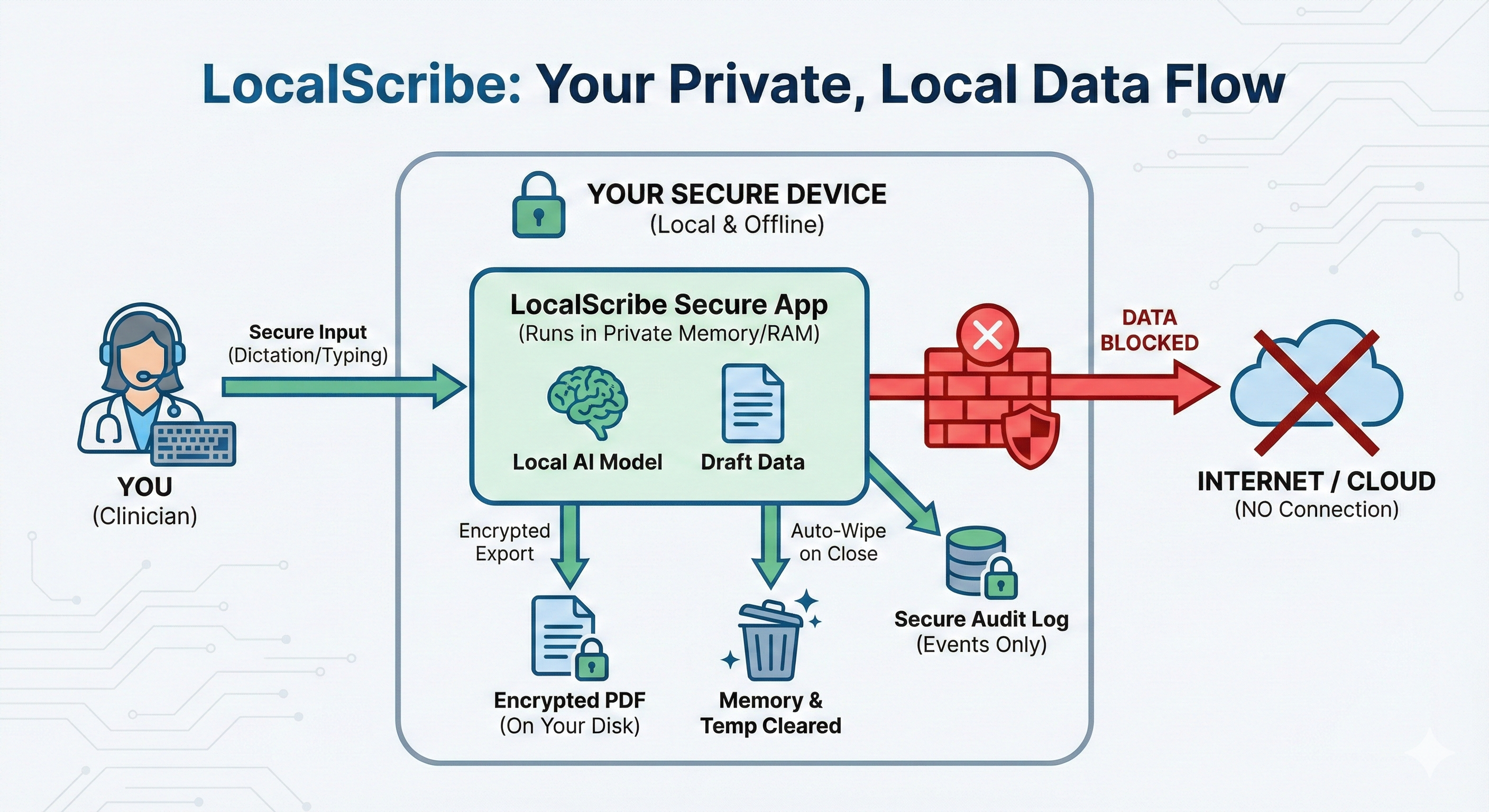
No data sent to servers
Runs locally on your computer
AI-assisted clinical documentation
No data sent to servers
Runs locally on your computer
Notes in seconds
Reports in minutes
Built for local documentation workflows
Built around real note and report work
Fight w/ partner this weekend. Slept 4 hrs. Tearful at start. Ambivalent about boundary-setting call tonight. Practiced grounding. Identified all-or-nothing thinking. Boundary-setting call tonight. Denies SI/HI.
Referral for attn/executive functioning concerns. Teacher reports weak task initiation, incomplete independent work, and need for repeated prompts. Obs: quiet at start, needed 2 prompts to begin independent work, off-task during transition, re-engaged once task demands were clarified. Concern is that attn + working memory are affecting independent classroom productivity. BRIEF-2 Teacher Working Memory T=68.
Intake. Client seeking therapy for panic episodes, insomnia, and work stress after role change 3 mos ago. Reports chest tightness, racing thoughts, avoidance of driving on highway, and calling out from work twice this month. PHQ-9 13, GAD-7 15. No SI/HI. Lives with partner, good support. Prior therapy in college.
Today 5/1/26. Tx plan dates 5/1/26-8/1/26. Dx GAD w panic + adj d/o anxious mood after promotion. panic 3-4x/wk. avoids highway driving. poor sleep 4-5 hrs many nights. called out from work 2x this month. CBT model reviewed: trigger = commute / boss email / chest tightness, thought = "I'm going to lose control". wants weekly x12 wks. coping already started: paced breathing, grounding. goals = fewer panic sx, drive highway again, challenge catastrophic thoughts, improve sleep/work attendance.
John Britton is a clinical psychology doctoral student focused on how mental health professionals can participate in shaping how artificial intelligence enters clinical practice. His interests sit at the intersection of psychology and technology, with an emphasis on ethical, transparent, and clinically responsible use rather than automation for its own sake.
I built LocalScribe while learning to build software myself. Part of that was trying to build my skills and resume. Part of it was that I had a good idea for a local-first clinical tool and wanted to make it real.
That is also part of why the site is more personal now. I want clinicians to see what it looks like when someone still in training builds, tests, and shares a tool in public while staying clear about what it can and cannot do.
Windows uses Microsoft Store. macOS is a direct download.
Drafting & Templates
Feature focus
Progress notes: SOAP, DAP, BIRP, Intervention-Response, and Simple Note. LocalScribe can take shorthand, partial documentation, or fuller clinical text and turn it into structured notes in seconds.
Feature focus
LocalScribe supports intake reports, treatment plans, termination summaries, session summaries, professional letters, referral letters, psychological evaluations, neuropsychological evaluations, school psychological reports, and test interpretation.
Feature focus
Build your own templates with custom sections, prompts, and documentation logic so LocalScribe supports your process instead of forcing a new one.
Inputs & Workflow
Feature focus
Type in shorthand or paste notes from any legacy editor. LocalScribe works with your text and expands abbreviations into structured documents in seconds.
Feature focus
Speak your notes in real-time for fast capture, or record your entire session for fuller draft context. Your voice never leaves your machine.
Feature focus
Use the Draft Queue when you have several notes or reports to get through. Queue multiple generations in succession and let LocalScribe work through them in order, which is especially helpful on slower computers or during back-to-back sessions.
Editing & Output
Feature focus
Use built-in clinical writing styles or fully custom writing instructions to dial in your voice across different note and report workflows.
Feature focus
Use the Refine button to provide any custom instruction and instantly update your note. You can process your text to be shorter, longer, more focused, or converted into a follow-up document from the draft you already have.
Feature focus
Attach DOCX, PDF, XLSX, TXT, and audio files that LocalScribe can use as drafting context. For most EHR workflows, copy and paste stays the fastest option. When you do need a file export, LocalScribe exports encrypted PDFs.
Libraries & Control
Feature focus
Save your terms, meanings, and preferred wording. Start with a specialty starter pack if you want, then make it your own and see exactly what the AI will use.
Feature focus
Built for report-heavy testing workflows with included tests, subtests, score types, and interpretation support. Add your own measures and keep reports closer to the batteries you already use.
Feature focus
Local-first design means drafting, transcription, and attachment processing run on your device instead of a remote server. The app also includes secure exports, troubleshooting tools, and model controls.
Mental health and allied health clinicians share the same documentation burden. LocalScribe adapts to your specialty, not the other way around.
Start with ready-made specialty terms, then make them your own. You can use starter packs for areas like music therapy, physical therapy, school psychology, and more.
Build structured frameworks for your discipline: functional goal SOAP notes, ADL evaluation formats, session plans, or specialized assessment structures. Your templates, your clinical logic.
Drafting stays local instead of routing clinical content to a remote AI service.
Use LocalScribe without internet once the app and model are installed.
Encrypted logs, auto-lock, biometric access, and timestamped audit trails.
Clinical drafting is designed to stay on your device during normal use.
Generate a privacy and risk review artifact: Create on-device documentation that can support an internal HIPAA or privacy review process.
Download a sample Privacy Integrity Report (PDF)These timing examples are meant to set expectations, not promise exact results. Performance depends on your hardware, available memory, and other open apps.
Daily notes, letters, and reports across faster and lighter systems.
| Document Type | Fast (Mac / Windows GPU) | Windows (CPU only) | Older (CPU only) |
|---|---|---|---|
| Daily SOAP Note |
Typical: ~20-80 sec
|
Typical: ~30 sec - 2.5 min
|
Typical: ~1-3.5 min
|
| Clinical Letter |
Typical: ~30 sec - 2.5 min
|
Typical: ~1-5 min
|
Typical: ~2-8 min
|
| Complex Report / Eval |
Typical: ~1-6.5 min
|
Typical: ~2-14 min
|
Typical: ~4-24 min
|
*Times vary by length of recording or shorthand input.
More available RAM and a stronger CPU or GPU generally improve drafting speed, especially for longer reports.
Performance also depends on available memory and other open apps.
Windows and macOS minimum and recommended specs.
Officially supported on macOS 12+ (Monterey and newer).
Current Mac builds are direct downloads. The app may show an unknown developer warning on first open. If you are comfortable proceeding, you can right-click the app and choose Open, or allow it in Privacy & Security after the first launch attempt.
Officially supported on Windows 10 (22H2)+ and Windows 11.
Windows uses Microsoft Store. macOS is a direct download.
Download the app, open it, and install a writing model from Settings. Once a model is selected, you can type or paste clinical material, choose a template, and create your first draft.
On macOS, the current direct-download build may show an unknown developer warning on first open. If you are comfortable proceeding, you can right-click the app and choose Open, or allow it in Privacy & Security after the first launch attempt.
See the System Requirements section for OS-specific minimum and recommended specs. In general, LocalScribe can run on 8 GB RAM systems, 12 GB+ is a better everyday target, and 16 GB+ is ideal for longer report workflows. GPU is optional and improves speed.
Drafting speed is measured in Tokens Per Second (tok/s), where one token is roughly 3/4 of a word. A modern Mac or Windows PC with a dedicated GPU drafts very quickly (35-75 tok/s). A standard CPU-only laptop runs slower (7-25 tok/s), taking a few minutes per draft. Complex reports will always take longer than daily progress notes.
With a cloud AI tool, note content has to travel to someone else's servers for processing. LocalScribe is built around a different path. Drafting, transcription, and attachment handling are designed to happen on your own computer instead.
That does not settle HIPAA by itself, because the full workflow still depends on the clinician, the local environment, and where exported material goes next. It does remove one major category of exposure that comes with routing sensitive content through an outside service.
LocalScribe was built for local clinical drafting workflows where privacy, access control, and auditability matter. It includes local processing, audit logs, auto-lock controls, encrypted exports, and a privacy report that can support an internal review process.
That is different from saying a clinic is automatically HIPAA compliant just because the app runs locally. Compliance still depends on the setting, policies, device security, storage, exports, and the clinician's own workflow.
Yes. After the app and the models are installed, LocalScribe can run offline for drafting workflows. Internet may still be needed for setup steps, updates, or downloading optional components.
Install the app, open it, and create your username. Then open Settings in the left navigation, click Models, and download a writing model that fits your computer. Once one is downloaded and selected, go back to the main screen, enter a few notes, choose a template, and click Create New Draft for your first generation.
If you want voice features, open the Settings modal and go to Dictation. Set the Dictation Model for live dictation. If you plan to use Session Recording or Audio Attachments, choose the model for those there too.
No. All AI inference happens locally. Audio, text, and generated notes stay on your machine. You control what you copy, export, or share.
LocalScribe is built with a local-first design so drafting, transcription, and attachment processing run on your device instead of a remote server. The only reusable content the app keeps locally is what you intentionally save for later, such as custom templates, custom terminology, and writing styles. Session materials are designed to clear when you close the note or app.
LocalScribe stores only your saved setup locally on your device, including things like custom templates, custom terminology, writing styles, and app settings. It does not store your clinical input or generated output, and it does not use any of that data to train AI models.