Five Clinical Tools Built Without Writing a Single Line of Code
Clinicians can get a working small tool out of an AI chat without typing HTML. Vibe coding is a loose name for that kind of AI-assisted build, where the model is doing most of the hand typing and you are steering, and the surface can be a web chat, a side canvas, a full project in an editor, or a mix. For these five I stayed in chat and live preview only, because a one-file or small-zip was enough to finish in a browser window I already use for everything else. The learnable part is naming the task, looking at the on-screen preview and saying what to change, and having a real sense of what a single file or a small download can and cannot do in a normal browser.
I walk that path in single-file HTML with an AI model with the full sequence in one place. The rest of the post is five one-off example tools I built, from a home breathing and grounding page to a referral dashboard on a spreadsheet, a DASS-21 scorer, a private DSM and CPT table, and a CBT-CP session companion for the published VA pain manual, each one saved from preview as a file or a small ZIP. I ran each build in the same AI chat I use for other work, from first prompt to download, in a loop: hold a clear user-level job, read the live preview against it, send the next fix when the preview drifts. The next section is how that loop played out in ChatGPT, Gemini, Claude, and Google AI Studio.
How I Built These
I used a few different products across these five builds, but the interface was the same kind of thing each time. The familiar chat window you get with the major models (the thread, the file upload, the follow-up prompt). In ChatGPT, Gemini, Claude, and Google AI Studio, that is still the main surface. I got a live preview in that same environment, went back and forth in the thread, and opened the canvas (or the equivalent side panel) when the layout or copy needed more room. I could test in the preview on every pass. I downloaded when the build was done.
Most of the HTML work happened in ChatGPT Plus with GPT-5.5 Thinking, in the regular chat window. The preview would open on its own. I left feedback in the thread, opened the canvas when I needed a wider surface for copy or layout, and tried the page in preview as I went. I downloaded when the build was done. The referral tracker and the blank Excel companion both came from that pass in ChatGPT. I opened the spreadsheet in the preview, adjusted what needed adjusting, and saved it the same way I had saved the page.
A lot of what I do in the thread is that kind of problem-solving. I say what I am trying to achieve, the model looks up or reasons about the real limits of the file or the browser, and we change the build instead of pretending the limit is not there. The referral tracker was one instance. I had pictured the HTML dashboard and an Excel file on disk staying in step the way two cloud products might, and there is no simple background sync for that in a normal local page. We checked what the browser allows and settled on open-from-the-page, save-back in Chrome or Edge when it can, import or export otherwise.
I built the breathing and grounding tool in Gemini, with Pro 3.1, the way I had been working in ChatGPT with GPT-5.5 Thinking. Thread, canvas, preview, then download when the build was done.
The DASS-21 file was the bumpiest pass. I used Claude Sonnet 4.6 on the free plan and put too much in a single prompt. The model hit its context cap, so I had to trim the spec or finish in a second pass. If you are building something this heavy on a free tier, that limit is a real pain point, not a quirk. Long item lists, scoring rules, and export options in one go will blow past the cap fast. The ZIP here is the file I ended up with after I worked around that.
The DSM/CPT page came from Google AI Studio, which did not add a separate charge for this kind of work on my end. I exported a single self-contained file from there. The CBT-CP protocol companion went back to the same ChatGPT Plus and GPT-5.5 Thinking setup I had used for the referral project.
Product names, plans, and limits will keep shifting. I still reach for a small, repeatable move. Get a file on the screen, react to it like a draft, shrink the prompt if the model says you are out of room, then download or export.
Each build took me about 10 to 15 minutes in total, with about 2 to 4 minutes to a first screen, then short rounds of feedback to fix labels, layout, and workflow. Most of the files are a single HTML page you open in a browser. You can keep them local, share them, or put them on a free static host like Netlify for phone use. The DASS-21 file is a ZIP here because the site serves it that way. Unzip and open the .html file inside. The DSM/CPT helper is one HTML file. If you use Google AI Studio, your export might look like a small folder. Unzip and open the main index.html the same way.
1. Breathing and Grounding Tool
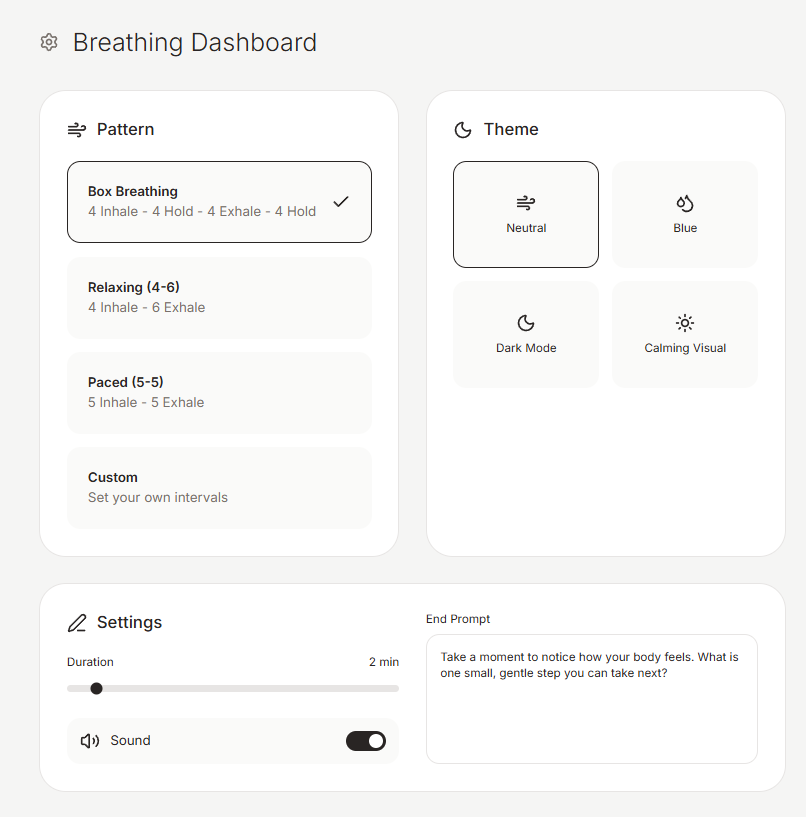
A breathing and grounding view turns a skill you already teach into something the client can run at home in a browser, without a separate subscription.
This build fits when you need a client-facing exercise you can tune (timing, look, copy) and hand off as a file or link, not a one-size app store download.
2. Referral Tracker Connected to Excel
Download the blank sample spreadsheet (XLSX)
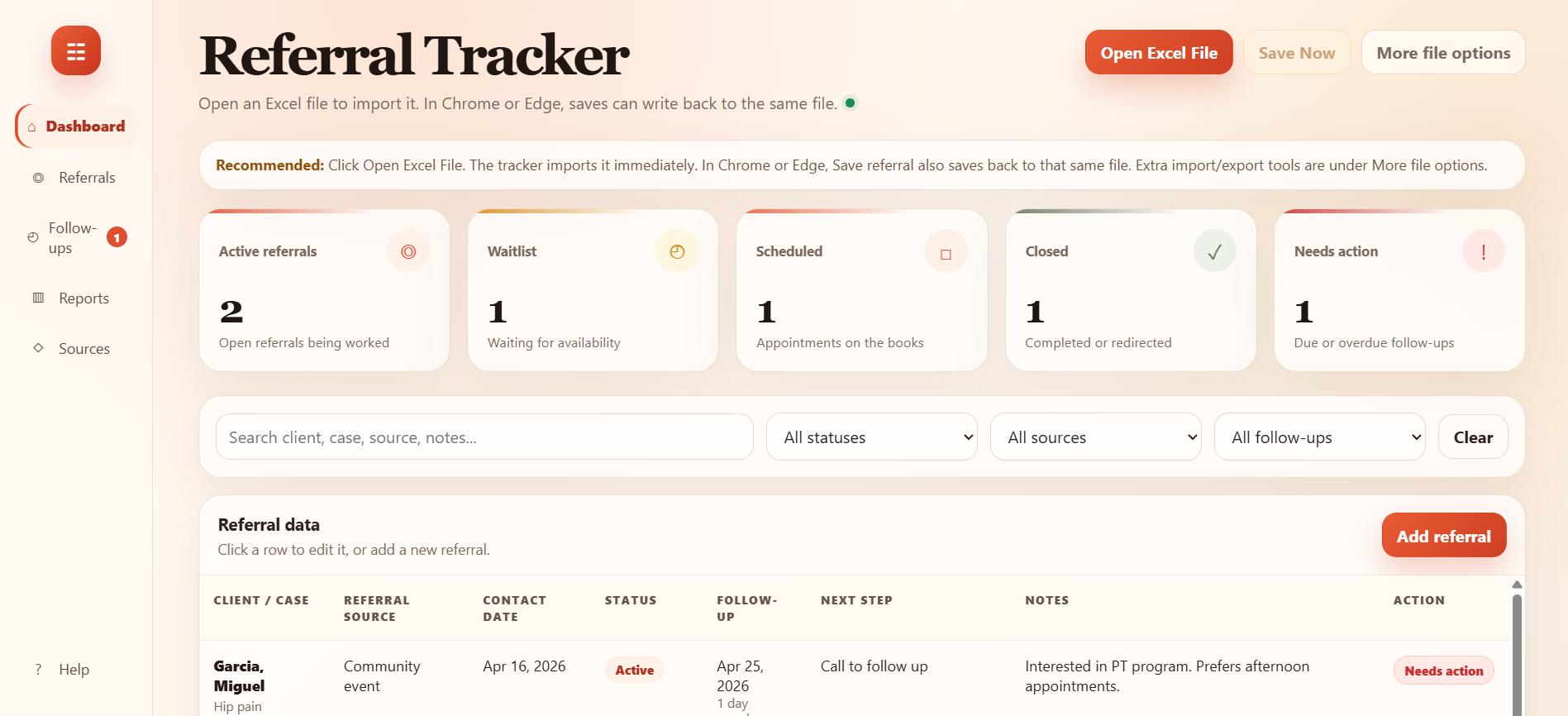
A referral tracker is a dashboard on top of a spreadsheet. The blank companion spreadsheet is a layout you can swap for your own file. The spreadsheet stays the system of record. The page is for follow-up dates, status, and what needs doing next, especially in Chrome or Edge where the tool can write back to the file you opened.
This build fits when the numbers already live in Excel or CSV and the pain is “who needs a call and when,” not a new database.
3. DASS-21 Scorer and Visualizer
Download the DASS-21 scorer and visualizer (ZIP)
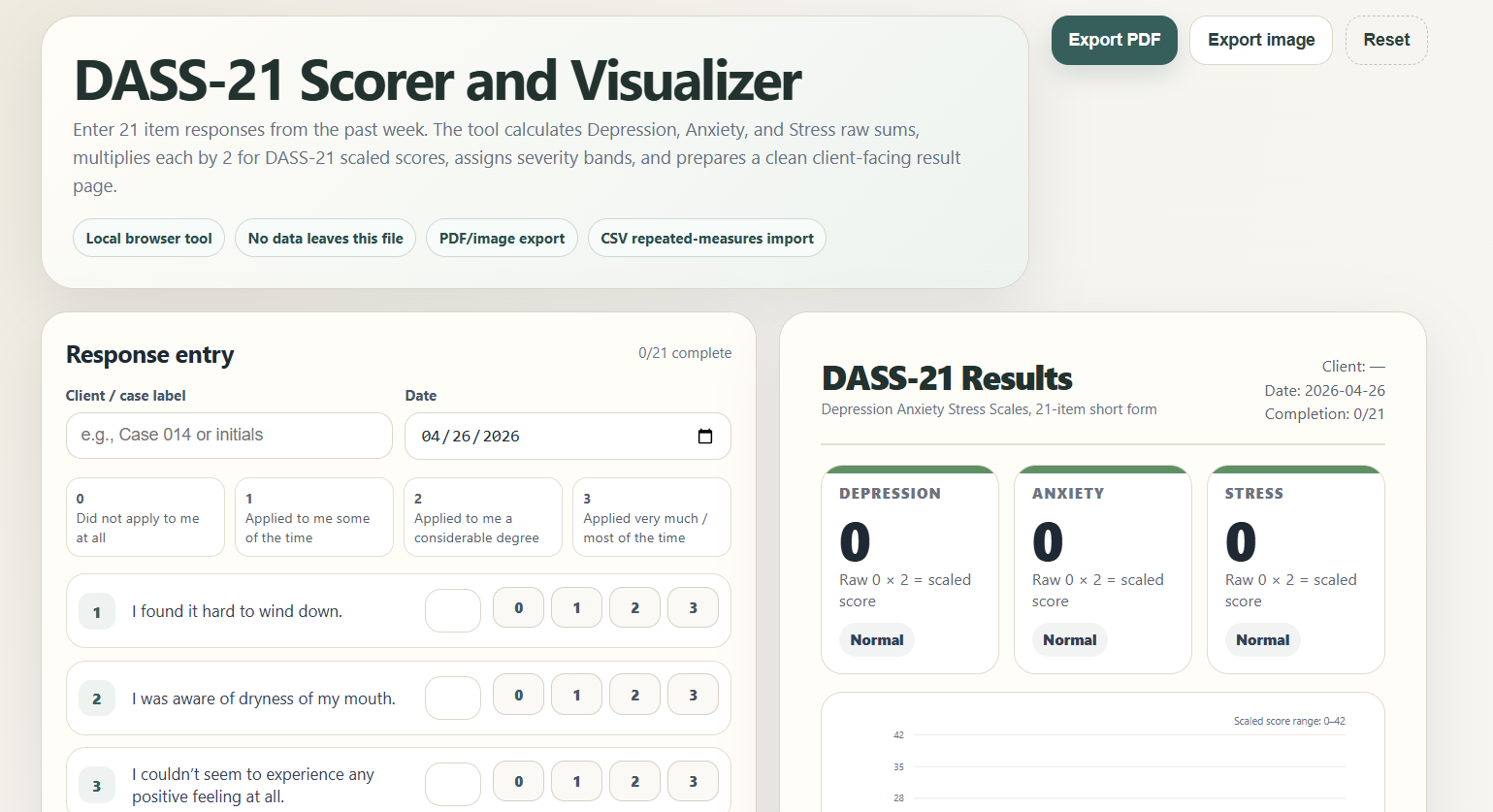
A measure scorer takes item-level responses and returns subscales, bands, and a view you can show or file. DASS-21 has three subscales (Depression, Anxiety, and Stress). Client-facing text still follows your own standards for any screener output.
This build fits when you run the same measure on a schedule and are tired of doing the same arithmetic in the margin of a note.
4. DSM/CPT Lookup Helper
Download the DSM/CPT lookup helper
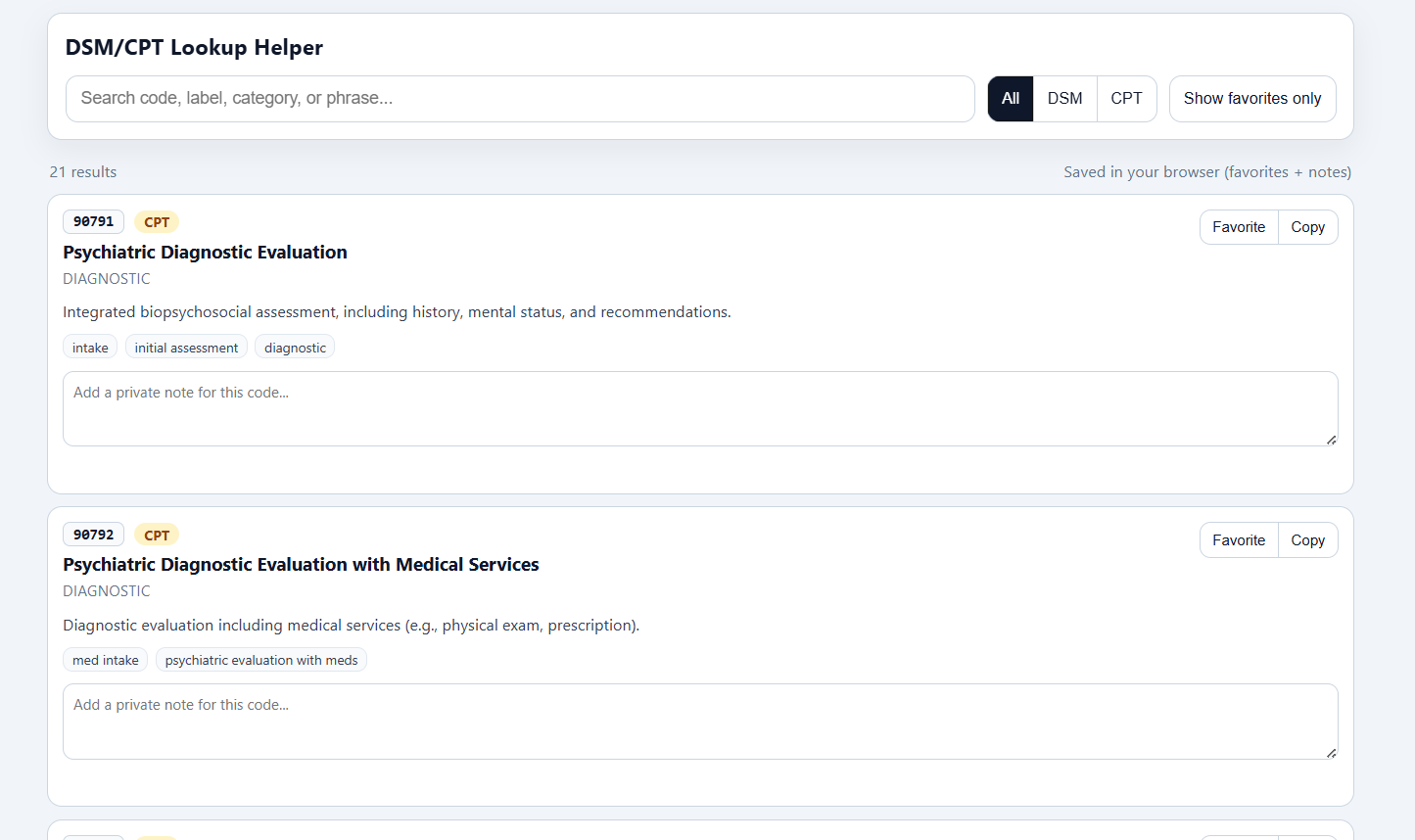
A lookup page is a private reference surface. The sample rows are placeholders. The useful part is the search, split between DSM-style and CPT-style lines, and space for your own short notes. The same build can back other lists, such as accommodations or internal procedures, if the data is yours to hold locally.
This build fits when you already know which codes and phrases you reach for and you want them in one place with copy you trust, not a generic commercial search.
5. Manualized Treatment Companion
Download the CBT-CP protocol companion
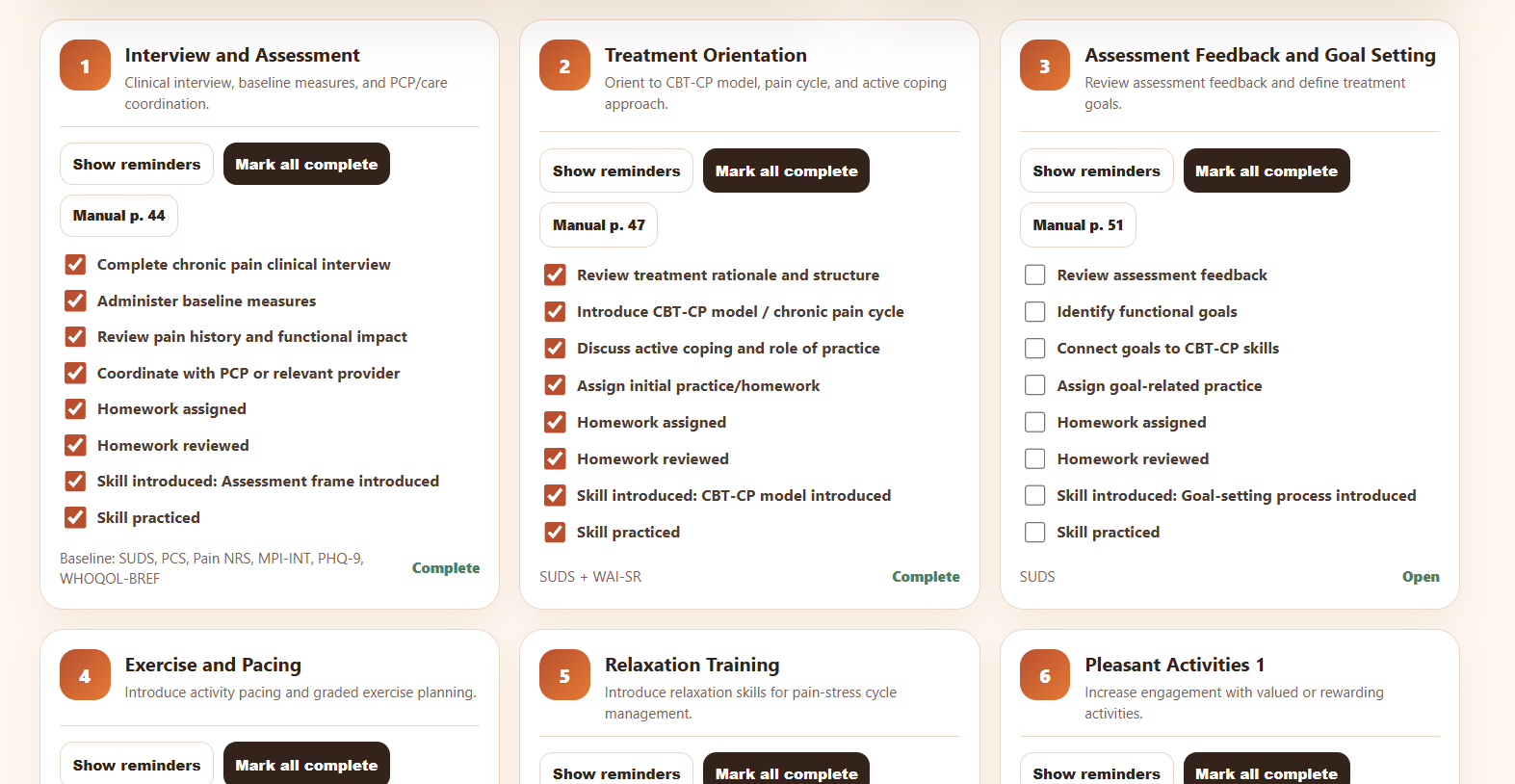
A protocol companion is a working checklist next to a manual. It is meant to sit with the VA CBT for Chronic Pain therapist manual. VA CBT-CP resources for providers list the current file. Download the official PDF, place it in the same folder as the HTML file as CBT-Chronic-Pain-Therapist-Manual_2025_508.pdf, or set the Manual link base field in the page to match your filename. The manual is not in these downloads. Progress stays in the browser. It is a workflow aid, not a chart.
This build fits when a treatment manual has a fixed number of sessions and you want a visible map of what is done, due, and linked to a page in the book.
What These Tools Demonstrate
For the person doing the work, the friction is often repetition or the same technical move every time. Apply a scoring rule, find that row in a sheet, hit the same session checklist. The steps are consistent enough to describe, and a single HTML file is a good container for that kind of bounded behavior, which is also what makes these builds fast to revise.
Each of these has a small enough structure that a model can fill it in quickly. The breathing page has a timing flow and a visual layer. The referral page has table rows and a few status lines. The DASS-21 file has fixed items, rules, and output targets. The lookup page has a dataset and filters. The protocol page has sessions, checkboxes, and a progress readout.
Across the five example tools, I was trying to put information somewhere I could actually look at it. Which follow-up is due, what the subscales land on, which session I am in. The protocol companion is the most direct. It takes what you are already doing in a manualized flow and leaves a trail you can see between sessions. The referral page does a similar job on the office side, where the next step and the follow-up date are easy to lose in a long sheet. None of this replaces judgment. It is so you can see your own next move without reconstructing it from memory every time.
The same habit helps with organization. A lookup page, a measure scorer, and a session checklist are all ways to put the right handout, code line, or procedure next to the moment where you use it, instead of hunting the same place for the tenth time in a week. You get more mileage from one file you refine across cases, instead of re-building from memory every time the situation shifts a little.
Some of these files stay on your own screen. Others are natural to hand to a client, a trainee, or a consult group, depending on the file and the setting. A single HTML file can also travel as a download, a quick Netlify link, or something you send home for between-session practice. The page has to be something you are willing to open again. Plain and reliable beats polished and avoided.
Most clinicians are used to receiving software from EHRs, agencies, publishers, app stores, and billing platforms. A different first question is worth practice. What could I build for myself? Useful ideas often start from friction, repetition, or a sheet that never quite fits how you search or track.
I only used the model while I was building. After that you have a normal file of HTML, CSS, and JavaScript. It runs in a browser like any other small page. For this kind of tool, that is usually enough.
How to Adapt These Examples
A working download beats a blank prompt when you are only changing the problem a little.
You can upload a file into a web chat, or open the same download on your machine and work from a project folder. Cursor, VS Code, Claude Code, Claude Cowork, and other AI-coding setups are all fine for that. The HTML is a normal file, and a ZIP is a normal folder once you unzip it. Ask for one self-contained file. Name the new measure, workflow, or protocol you have in mind.
Use this DASS-21 scorer as a model. Build the same kind of tool for this other measure. Here are the items, scoring rules, and severity bands.
Use this referral page as a model. Change the fields so it tracks consultation requests instead of referrals.
Use this breathing page as a model. Make it child-friendly with a space theme and a shorter default session.
You keep the parts that already work. You change the parts that do not match your setting.
What In Your Week Already Looks Like a Build
Think about something you do more than once a week. Fixed inputs, predictable output, and the same steps in the same order. A measure you score the same way. A list you reread. A protocol where session five always asks for the same homework check. A spreadsheet that would be fine if the next action were visible.
When you can name that kind of repeat task, you already have something concrete to prototype. The five example tools in this post are my own first passes at the same idea.
Downloads
The links below are starting points. Open a file in a browser to see how it works, upload it to a chat, or open the file or folder in Cursor, VS Code, Claude Code, Claude Cowork, or whatever you already use for AI-assisted coding. Same files, different workspace.
- Breathing and grounding tool (HTML)
- Referral tracker (HTML) and blank sample spreadsheet (XLSX)
- DASS-21 scorer and visualizer (unzip, then open the HTML inside)
- DSM/CPT lookup helper (HTML)
- CBT-CP protocol companion (HTML). For working manual links, place the VA therapist manual PDF in the same folder with the default filename, or set Manual link base in the page.
Subscribe for future posts
If you want new writing at the intersection of AI and psychology, ethics, and implementation of AI in clinical practice, subscribe on Substack.
The views expressed here are my own and do not necessarily reflect the views of any current or future employer, training site, academic institution, or affiliated organization.